AI Agent Studio Fundamentals: What It Is, What It Isn't, and When to Use It
Series #1: AI Agent Studio for Fusion Applications — A Practical Developer's Field Guide to Enterprise AI Agents
(Post 1 of 5)
Another week, another AI announcement — that's probably the reaction most of us have when something new shows up in the Fusion release notes. Fair enough. But AI Agent Studio is worth a closer look for one reason that has nothing to do with hype: it's a no-cost, built-in extensibility layer that sits next to the tools you already maintain — VBCS, OIC, BI Publisher, REST APIs — not in place of them.
This first post in the series is deliberately not hands-on. Before opening the tool, it's worth getting the vocabulary and the architecture straight, because almost every confusing moment later in this series traces back to conflating two of these terms. Post 2 gets into the build.
Why This Exists Now
Fusion's AI direction has been moving from assistive features — dashboards, copilots, summarization — toward agents that can take action inside a business process: reasoning about a task, deciding next steps, and executing them within existing approval and security boundaries. AI Agent Studio is the toolset Oracle ships for building and managing that layer — both extending the agents Oracle already packages with Fusion, and creating new ones from scratch.
That's the whole pitch, stripped of marketing language. The rest of this post is about what that actually means structurally.
Core Vocabulary — Define Before You Build
These three terms get used loosely in conversation, but they describe distinct concepts. The diagram further below maps how they're actually implemented as components inside the tool.
|
Term |
What it
means |
What it's
NOT |
|
Agentic
application |
The conceptual
idea of a coordinated group of agents, each with a role, working together
toward a business outcome — with orchestration logic and decision authority
built in. Inside AI Agent Studio this is implemented as an “Agent Team,”
covered in the architecture diagram below. |
Not just
“several agents running near each other.” The coordination and role
separation is the defining feature. |
|
Orchestration |
The logic layer
that sequences agents, passes context between them, and enforces approval
checkpoints. |
Not the same as
a simple deterministic if/then rule — orchestration here is reasoning-aware. |
|
Grounding /
knowledge source |
The data an
agent is permitted to read from at runtime in order to answer a question or
make a decision. |
Not training
data. This is retrieval against current, live, scoped data — covered in depth
in Post 3. |
AI Agent Studio Architecture
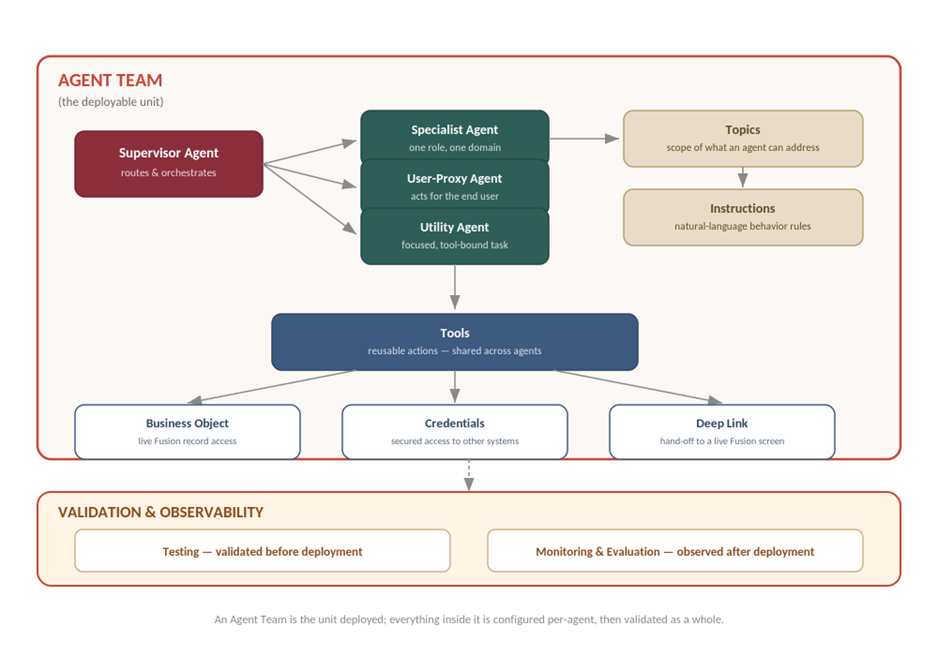
With the vocabulary established, here's how those pieces actually fit together inside the tool. An Agent Team is the deployable unit; everything else — agents, topics, tools, instructions — is configured underneath it and then validated as a whole before and after deployment.
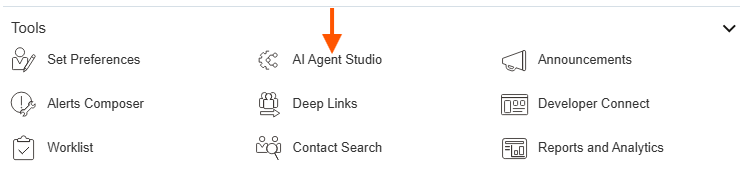
The fastest way to see this structure confirmed in your own tenant is the bottom navigation bar inside the tool itself, which lays out most of these as first-class sections: Apps, Agent Teams, Agents, Tools, Topics, Deep Link, Business Object, Credentials, and Monitoring and Evaluation.
The diagram below maps how those sections relate structurally — it's the mental model worth carrying into Post 2, where this gets built hands-on.
Where It Sits in the Stack
For a dev coming from classic Fusion extensibility, the fastest way to place this tool is by comparison to what you already use:
• VBCS extends the UI layer. AI Agent Studio extends the decision/behavior layer — it doesn't render screens, it reasons about what should happen.
• OIC orchestrates deterministic integrations — fixed steps, fixed branching logic. AI Agent Studio's orchestration is reasoning-based: the path through a process can vary based on what an agent concludes, not just on hardcoded conditionals.
• BI Publisher reports on data after the fact. AI Agent Studio's agents act on data in the moment — reading it, reasoning over it, and in some configurations writing back to it.
Structurally, requests flow from the Fusion Apps UI into AI Agent Studio's build-and-manage layer, which calls out to an underlying large language model (Oracle gives you a choice here — worth confirming what's available in your tenant before committing to a design), and every action an agent takes is still bound by Fusion's existing role-based security and data access framework. Nothing here bypasses the security model you already work within — it operates inside it.

Key Components of AI Agent Studio
With the vocabulary and stack position established, it's worth one more layer of detail before touching the tool: the actual building blocks you'll assemble inside AI Agent Studio. These map closely to the terms above, but seeing them as distinct, named components — the way the product itself models them — makes the hands-on work in Post 2 much less confusing.
The fastest way to see this list confirmed is the bottom navigation bar inside the tool itself, which lays out the components as first-class sections: Apps, Agent Teams, Agents, Tools, Topics, Deep Link, Business Object, Credentials, and Monitoring and Evaluation.
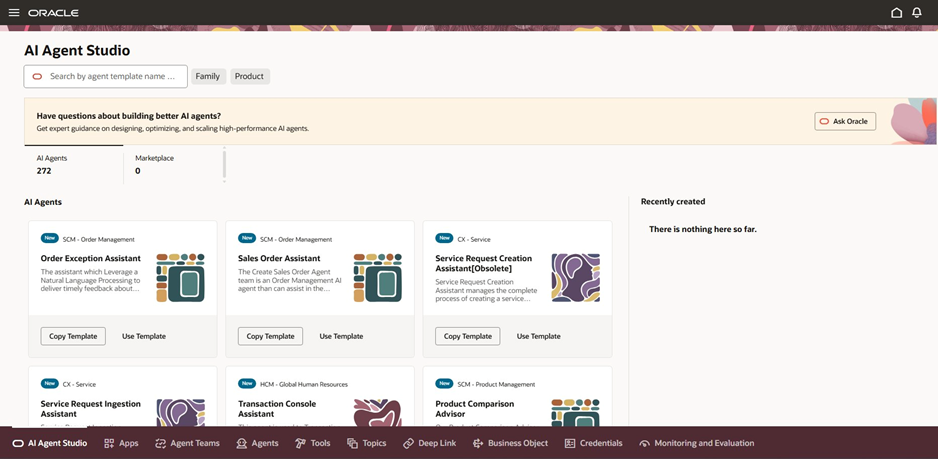
The table below walks through each of those in plain language, including a few — Business Object, Credentials, and Deep Link — that don't get much airtime in Oracle's higher-level marketing material but matter a lot once you're actually building.
|
Component |
What it does |
Illustrative
example |
|
Agent team |
The deployable
unit — a structured sequence of steps that one agent, or a coordinated group
of agents, follows to complete a task or answer a query. This is what
actually gets deployed; an individual agent on its own isn't. |
A recruiting
agent team that screens resumes, schedules interviews, and generates offers
based on policy and approval rules. |
|
Agents |
The reasoning
unit inside a team. Each agent uses an LLM to plan, gather information, and
act. Oracle's docs group agents by role — user-proxy (acts on behalf of a
business user), supervisor (orchestrates other agents in a flow), and
specialist/utility (focused on one role or tool). Agents can also carry
traits like being persona-based (e.g. “benefits administrator”) or
tool-using. |
A supervisor
agent routing a request to a specialist payroll agent. |
|
Topics |
The boundaries
of what an agent is allowed to talk about or act on — essentially scoping its
area of expertise. |
A benefits
agent scoped to topics like HSA, retirement, and stock plans — and nothing
outside that. |
|
Tools |
Reusable
utilities an agent can call to actually do something — not just reason about
it. Tools are assigned to agents and can be shared across multiple agents. |
A document
retrieval tool for RAG, a calculator tool, an email tool, a business object
tool. |
|
Business
Object |
The structured
representation of a Fusion record — an invoice, an employee, a sales order —
that tools and agents read from or write to. This is what ties an agent's
actions back to real transactional data rather than free text. |
A Business
Object tool bound to the Sales Order record, so the agent reads live order
status instead of a description of one. |
|
Credentials |
The credential
store that holds the permissions and access keys an agent needs to call out
to other systems — internal Fusion APIs or external third-party services —
without those secrets being hardcoded into the agent's configuration. |
A stored
credential that lets an agent call an external shipping-carrier API on behalf
of the order management process. |
|
Deep Link |
A configured
link that lets an agent hand a user off directly into a specific Fusion
screen or record, instead of just describing what to do next. |
An agent that
answers a question about an open service request and includes a deep link
straight into that request's detail page. |
|
Instructions |
The
natural-language rules attached to a topic that shape how the agent should
behave — effectively the guardrails baked into the prompt sent to the LLM. |
“Confirm the
number of dependents before answering a payroll deduction question — if you
don't know, don't guess.” |
|
Testing |
Built-in
tooling to validate an agent team's configuration before deployment —
checking that topics, tools, and instructions are wired correctly, and that
the agent's reasoning and cited sources hold up. |
Running a set
of likely user questions against the agent and reviewing how it arrived at
each answer. |
|
Monitoring
and Evaluation |
The
observability layer for agents already in use — tracking quality,
performance, and behavior over time, separate from the pre-deployment Testing
component above. |
Reviewing
flagged low-confidence responses from a deployed agent over the past week to
decide if its instructions need tightening. |
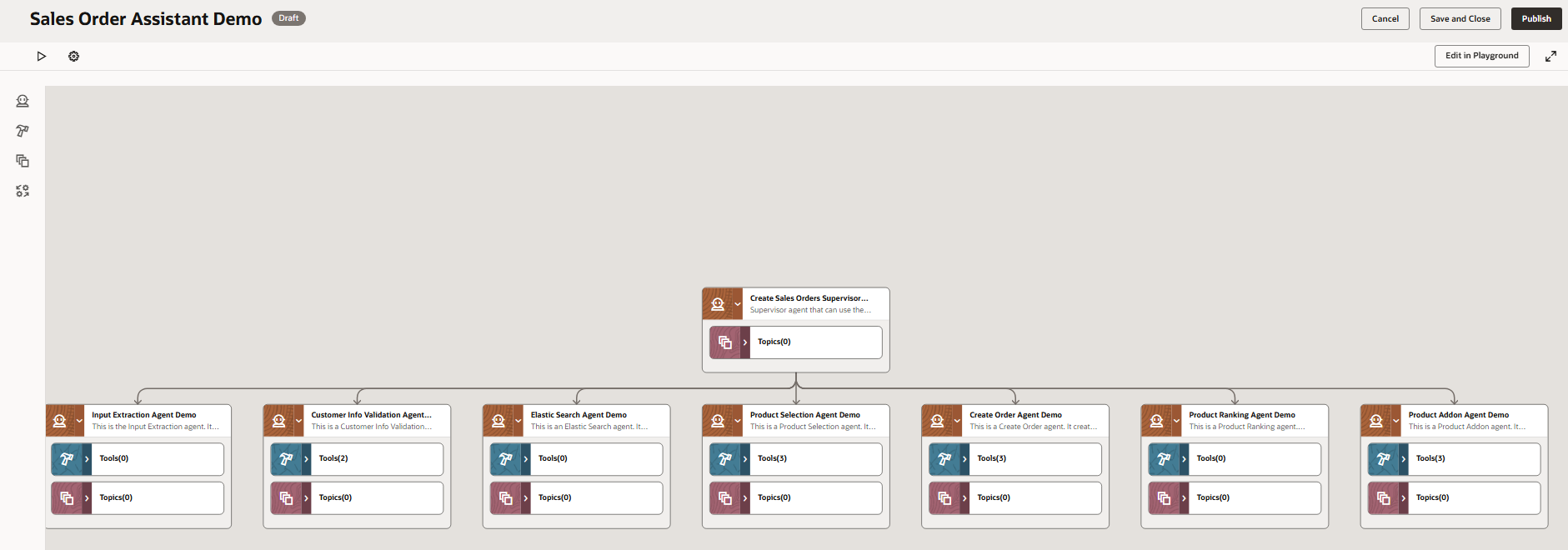
Two things worth internalizing from this table before moving on. First, an individual agent is never deployed on its own — it has to belong to an agent team, even if that team consists of exactly one agent. Second, topics, tools, and instructions are the three levers that actually shape an agent's behavior day to day; testing and monitoring are how you confirm those levers are configured correctly — testing before deployment, monitoring after.
Extend vs. Build — The First Decision Every Dev Makes
Before writing anything, every project using AI Agent Studio runs into the same fork: extend a pre-packaged agent Oracle already ships, or build a new one from scratch. Getting this decision wrong early tends to cost the most time later, so it's worth treating as a deliberate step rather than a default.
“Extending” a pre-packaged agent generally means adjusting its scope, the data it's allowed to read, and which skills are attached to it — not rewriting its core reasoning from zero. “Building” means defining a new role, scope, and skill set entirely. Neither is inherently the right call — it depends on how close an existing agent already gets you.
|
If this is true… |
…then lean toward |
|
A pre-packaged agent
already covers roughly 80% of what you need |
Extend the existing agent |
|
The use case needs a wholly
new role, data scope, or set of skills |
Build a new agent |
|
The process spans more than
one functional area or needs multiple roles cooperating |
Design an agentic
application, not a single agent |
|
You're not sure yet and
just want to learn the tool |
Start with a small custom
agent (this is exactly what Post 2 walks through) |
Oracle Fusion Applications AI Agent Marketplace: https://www.oracle.com/applications/fusion-ai/ai-agent-marketplace/#agents
|
A note on LLM choice and
governance If your organization has standards around which LLM
providers are approved for use, or data residency requirements, that
conversation belongs before any agent design work — not after. Loop in
whoever owns that decision early. |
What This Post Isn't Covering
This post stayed deliberately at the orientation level. The rest of the series gets concrete:
1. Post 2 — building a first, simple agent end to end, including testing and deployment.
2. Post 3 — connecting an agent to real knowledge sources and grounding it properly.
3. Post 4 — chaining agents into a full agentic application with orchestration and approval checkpoints.
4. Post 5 — what it takes to get an agent into production: security, observability, and measuring ROI.
Over to You
If you've already had to make the extend-vs-build call on something — even a rough prototype — it's worth comparing notes. Drop a comment with what tipped your decision one way or the other; it'll likely shape what gets emphasized later in this series.
Next up: Post 2, where we open the tool and build something.