One Pool, Many Databases: Consolidating Autonomous AI Database the Smart Way
A developer's guide to consolidating dozens (or hundreds) of Autonomous AI Database instances into a single billing envelope — and cutting compute spend by up to 87% in the process.
The Problem: Paying Full Price for Idle Capacity
If you support Fusion Apps extensibility work, you have probably provisioned more Autonomous AI Database instances than you'd like to admit. A dev instance for VBCS. A sandbox for OIC integration testing. A reporting clone for BI Publisher datasets. A throwaway database for a REST API proof of concept. Each one seemed cheap in isolation — but multiply that pattern across a team, a project and the compute bill adds up fast.
Autonomous AI Database enforces a minimum of 2 ECPUs per instance outside of a pool. Fifty small databases, each barely using a fraction of an ECPU, still bill for a combined 100 ECPUs minimum — every hour, whether anyone is querying them or not. That gap between what you provision and what you actually use is exactly what elastic pools are designed to close.
This article walks through what elastic pools are, how the billing model actually works (with real numbers), how dedicated elastic pools differ, and how to stand one up yourself — whether you manage a handful of extensibility sandboxes or a multi-tenant SaaS estate.
What Is an Elastic Pool?
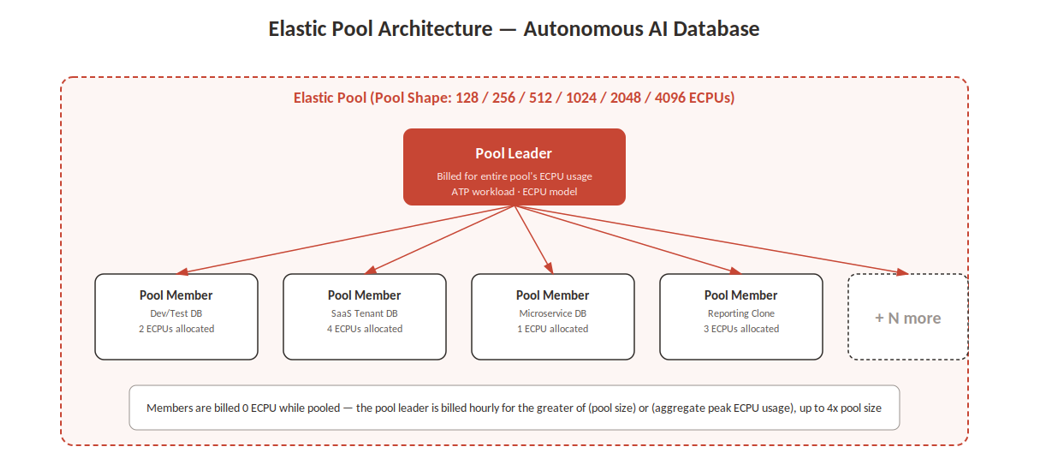
An elastic pool is a logical grouping of Autonomous AI Database instances for the purposes of compute billing and administration. Think of it as a family mobile plan: instead of every line paying for its own minutes, the whole family shares one pool of minutes and one bill. In an elastic pool, one instance becomes the pool leader and is billed for the aggregate ECPU usage of every instance in the pool. Every other instance — a pool member — draws compute from that shared pool without generating a separate line item.
This matters because Autonomous AI Database's ECPU-based memory and I/O allocation is tied directly to ECPU count. Inside a pool, you can give a member database a generous ECPU allocation for burst performance without paying for that allocation individually — the cost is absorbed by the pool leader's pool-size billing, not the member's instance size.
Elastic Pool Terminology
|
Term |
Definition |
|
Pool Leader |
The Autonomous AI Transaction Processing instance that
creates the pool and is billed for the pool's aggregate ECPU usage. |
|
Pool Member |
Any Autonomous AI Database instance (ATP or Lakehouse
workload) added to an existing pool. Not billed individually while pooled. |
|
Pool Shape / Size |
The fixed compute tier you select at creation — 128,
256, 512, 1024, 2048, or 4096 ECPUs — which sets your baseline hourly bill. |
Architecture at a Glance
The diagram below shows a typical elastic pool: a pool leader billed hourly for the pool shape, and multiple pool members of varying sizes drawing from that shared compute envelope.
How Elastic Pool Billing Actually Works
Elastic pool billing covers compute (ECPU) only — storage is still billed per instance regardless of pool membership, except in dedicated elastic pools, which bill storage at the pool level too (more on that shortly).
The core rule: if the pool's aggregate peak ECPU usage in a given hour is at or below the pool size, you're billed exactly the pool size — one time. If usage spikes above the pool size, you're billed for actual usage, up to a hard ceiling of 4x the pool size (the pool capacity).
|
|
Worked Example 50 databases at 5 ECPUs each
would normally bill for 250 ECPUs minimum. Migrated into a 128-ECPU elastic
pool with real utilization around 2 ECPUs per instance, the same 50 databases
— plus room for a new 28-ECPU database — bill at just 128 ECPUs per hour. If
usage spikes, the pool can automatically extend up to 512 ECPUs (4x) before
you'd need a larger pool shape. |
Two nuances worth remembering when you're the one signing off on the architecture decision:
• Billing continues at a minimum of 1x pool size even if every database in the pool is stopped — the pool itself, not just its members, is what's being billed for.
• When a pool is created or an instance joins/leaves mid-hour, that instance is billed individually for the pre-pool portion of the hour, then the pool billing takes over.
• Storage is billed separately per instance in a standard elastic pool — plan your ECPU consolidation savings independently from your storage costs.
Cost Comparison: 512 Instances, With and Without a Pool
|
Scenario |
Instances |
Min. ECPUs / Instance |
Total ECPUs Billed |
|
Without elastic pool |
512 |
2 (platform minimum) |
1,024 |
|
With a 128-ECPU elastic pool |
512 |
as low as 1 |
128 (up to 512 at peak) |
That's the basis for Oracle's published figure of up to 87% compute cost savings when consolidating many small, lightly used databases into a pool — the more instances you consolidate, and the lower their individual utilization, the closer you get to that ceiling.
Standard vs. Dedicated Elastic Pools
Oracle also offers dedicated elastic pools, where the pool leader and every member run on the same underlying infrastructure. The trade-off is control: dedicated pools give you a custom maintenance window, the ability to pause patching for up to four weeks, and unified compute-plus-storage billing at the pool level — useful if your organization has compliance-driven patch scheduling requirements that a standard pool can't accommodate.
|
Capability |
Standard Elastic Pool |
Dedicated Elastic Pool |
|
Infrastructure |
Members may span shared infrastructure |
Leader and members share the same dedicated
infrastructure |
|
Storage billing |
Billed per instance, independent of pool |
Billed at the pool level alongside compute |
|
Patch scheduling |
Standard maintenance windows |
Custom day/2-hour window, plus 4-week patch pause
option |
|
Burst capacity |
Up to 4x pool size |
Up to 4x pool size |
|
Typical fit |
General consolidation, SaaS multi-tenancy |
Regulated workloads, complex migrations, strict patch
control |
For most Fusion Apps extensibility teams — dev/test sandboxes, VBCS backends, OIC staging databases — a standard elastic pool is the right starting point. Reach for a dedicated pool when patch-window governance or predictable all-in billing (compute and storage together) is a hard requirement.
Hands-On: Creating an Elastic Pool
The walkthrough below assumes you already have at least one Autonomous AI Database instance using the ECPU compute model, with auto-scaling disabled and no Autonomous Data Guard configured — both are prerequisites for pool membership.
|
Step |
Action |
|
1 |
In the OCI Console, open the Autonomous AI Database
instance you want to designate as the pool leader (must be an ATP workload
type). |
|
2 |
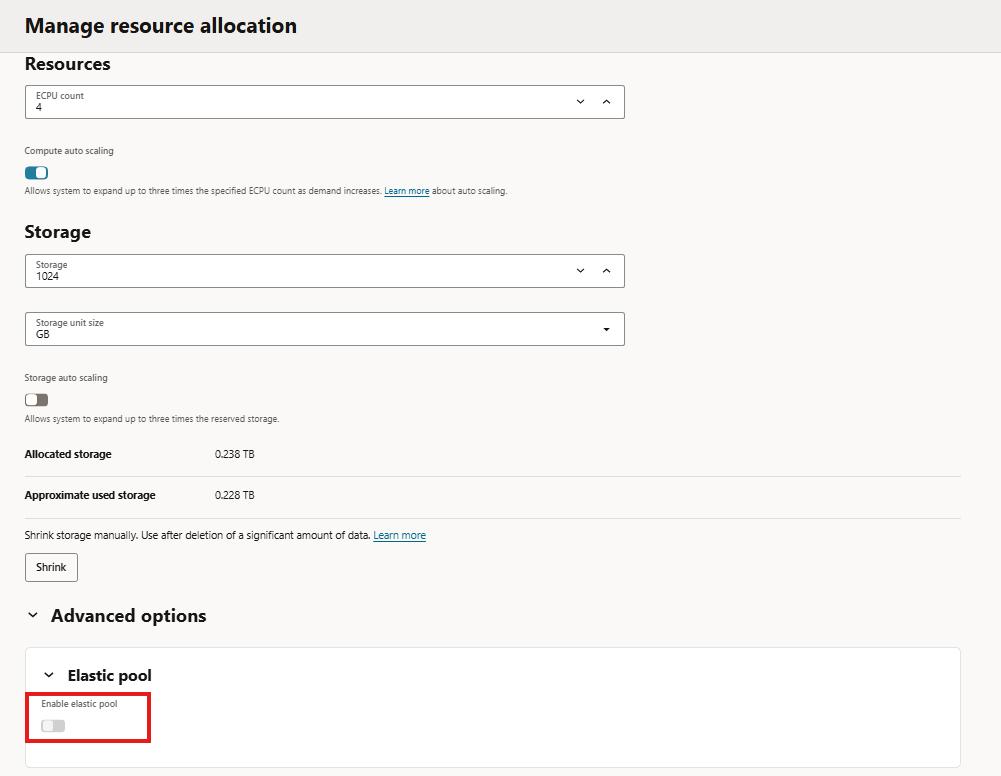
Under Resource Allocation, locate the Elastic Pool
section and choose Create elastic pool. |
|
3 |
Select a pool shape (128 / 256 / 512 / 1024 / 2048 /
4096 ECPUs) sized to your aggregate expected usage, not your provisioned
maximum. |
|
4 |
Confirm creation. The instance becomes the pool leader
and starts billing at the pool-size rate immediately. |
|
5 |
Open each additional database you want to consolidate
and choose Join elastic pool, selecting the pool you just created. |
|
6 |
Repeat for every candidate instance — dev sandboxes,
integration test databases, reporting clones — provided each meets the
ECPU-model, no-Data-Guard prerequisite. |
|
7 |
From the pool leader's details page, use Monitor
elastic pool to confirm aggregate ECPU usage is tracking under the pool size. |
|
8 |
After the pool has been running a full calendar month,
open View elastic pool cost savings to see the actual percentage saved versus
unpooled billing. |
|
|
For automation-minded developers Every step above is also
available through the OCI CLI and the Database service REST API, so pool
creation and membership changes can be scripted into your existing CI/CD or
environment-provisioning pipelines rather than done by hand in the console. |
Monitoring Usage and Savings
Once a pool has been live for at least one full calendar month, the pool leader's details page exposes three figures worth watching monthly: usage with the elastic pool, estimated usage without it, and the resulting cost savings percentage. The same data is available programmatically through the OCI_USAGE_DATA_EXT view and cost/usage reports, which is useful if you want to fold pool savings into a chargeback dashboard for stakeholders.
Practical Guidance for Fusion Apps Teams
• Right-size the pool shape to your realistic aggregate peak, not the sum of every instance's maximum possible ECPU count — you're optimizing for typical usage, not worst case.
• Group instances with complementary usage patterns in one pool: a batch-heavy OIC integration database and a mostly-idle VBCS dev sandbox smooth out each other's peaks better than two instances with identical usage windows.
• Remember storage is billed independently in a standard pool — pooling won't reduce storage spend, only compute.
• If your organization spans parent and child OCI tenancies, you can still consolidate savings by placing the pool leader in the parent tenancy with members in child tenancies.
• Re-check pool sizing quarterly. Extensibility workloads tend to grow as more VBCS apps, OIC integrations, and custom REST services go live, so a pool sized for today's footprint may need to move up a shape tier.
Closing Thoughts
Elastic pools are one of the more underused levers in the Autonomous AI Database cost toolbox — largely because the individual instance costs feel small until you count how many of them you're actually running. For teams supporting Fusion Apps extensibility work, where dev, test, and integration sandboxes multiply quickly, consolidating into a single elastic pool is a low-risk change that can meaningfully cut the compute line item without touching a single line of VBCS, OIC, or APEX code.
References

